
Have a Question?
How to Create Your Account on My Legacy Binder
Table of Contents
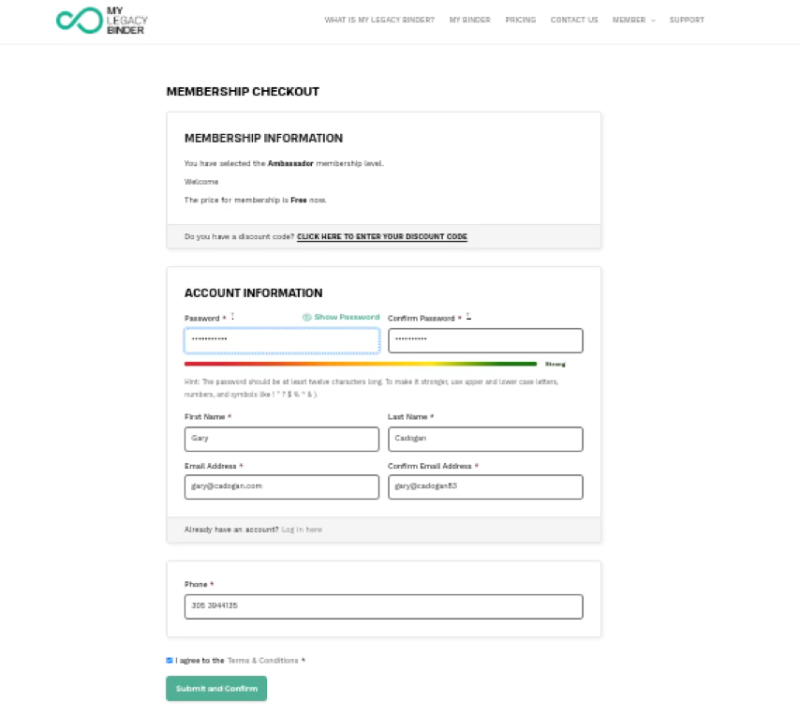
1. Verify Your Membership Level
At the top, you will see a section titled Membership Information. This area will display:
- The selected membership level (e.g., Ambassador).
- A message indicating if the price is Free, if applicable to your case.
Note: Do not modify anything here. If you have a discount code, click “CLICK HERE TO ENTER YOUR DISCOUNT CODE”; otherwise, proceed to the next step.
- Complete Your Account Information
This is the most critical section where you create your login credentials.
- A. Create Your Password:
- In the Password field, enter a secure password. It must be at least 12 characters longand include uppercase letters, lowercase letters, numbers, and symbols
- Re-enter it in the Confirm Passwordfield.
- B. Enter Your Name: Complete the First Name and Last Name fields.
- C. Enter Your Email: Enter your email in Email Address and repeat it exactly in Confirm Email Address. Ensure there are no spaces or typos
- D. Add Your Phone Number: Enter your number in the Phone field. Include the country code if you are outside the U.S..
3. Accept Terms and Conditions
You must check the box “I agree to the Terms & Conditions”. The system will not allow you to continue if this is not marked.
4. Submit Your Registration
Once all fields are complete, click the green “Submit and Confirm” button to send your request.
5. Verify Your Email
You will receive an email from My Legacy Binder to activate your account. You must open this email and click the confirmation link to enable your account.