
Have a Question?
How to Complete the Membership Process on My Legacy Binder
Table of Contents
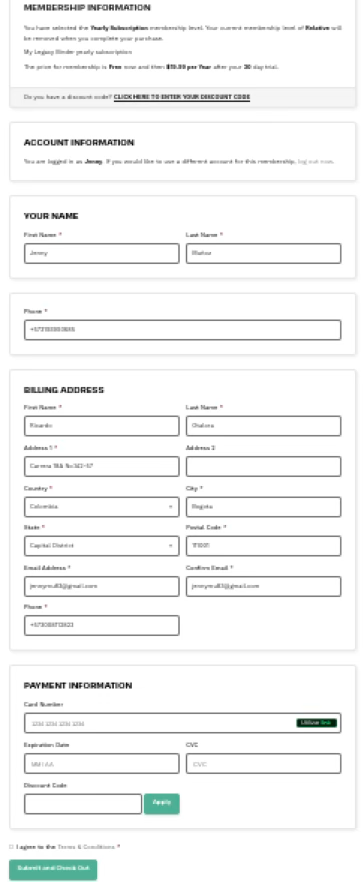
- Review Your Membership Information
At the top, you’ll find a section that shows:- The membership level you are selecting (for example: Yearly Subscription).
- Whether you already have a current membership or a previous plan.
- The price you will pay after the trial period (if applicable).
If you have a discount code, click:
CLICK HERE TO ENTER YOUR DISCOUNT CODE
If not, continue with the form.
- Account Information
In this section, you’ll see that you’re already logged in, so your main information may be pre-filled.- A. Verify Your Name
Check that the following fields are correct. If you need to change them, you can do so manually.- First Name
- Last Name
- B. Confirm Your Phone Number
In the Phone field, check that your number is correct. If you need to update it, edit it here.
- A. Verify Your Name
- Billing Address
You must complete or confirm the following information:- A. Billing First and Last Name
- First Name
- Last Name
These can be the same as your account information or different if required for billing.
- B. Full Address
Fill in the fields:- Address 1 (primary address)
- Address 2 (optional: apartment, office, etc.)
- Country
- City
- State (if applicable)
- Zip Code
- C. Email
Confirm:- Email Address
- Confirm Email Address
Both must be identical.
- D. Phone
Fill in the Phone field if it is not already registered.
- A. Billing First and Last Name